

Global settings
Jira administrators open Jira settings › Apps › AssertThat ATM.
Enable the app
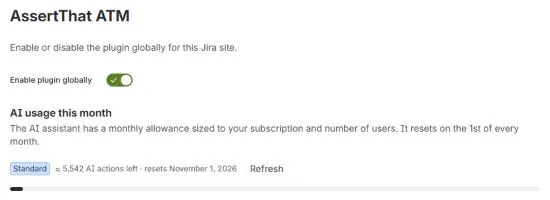
Section titled “Enable the app”Enable plugin globally switches AssertThat on or off for the whole Jira site. When it is off, no project shows the app. To switch it off for a single project, use Project settings.
AI usage
Section titled “AI usage”AI usage this month shows how much of the site’s monthly AI allowance is used, roughly how many AI actions are left, and when it resets. Click Refresh for the latest figure. Warnings appear when the site is nearing the allowance and when it is used up.
Top AI users this month lists who uses AI the most: the number of AI requests, their share of the allowance, and how much of their personal limit they have used. A Limit reached label marks people who have used their quarter of the allowance; their AI requests pause until the reset, and everything else keeps working.
Automation / CI import
Section titled “Automation / CI import”Manage the keys your pipelines use to import test results:
- the Import URL;
- API keys: Create API key with a name, see when each was created and last used, and Revoke keys you no longer need;
- CI snippets for common CI systems.
Automation imports lists every import from the last 30 days: when, project, format, key, status, the execution it wrote to, and the result.
Audit log retention
Section titled “Audit log retention”Set how many days the audit log keeps entries. The default is 730 days (two years).
Personal API keys
Section titled “Personal API keys”See every user’s personal API keys for REST and MCP access: owner, label, created, expiry and last used. Revoke any key, for example when someone leaves the team. The page also shows the API URL that scripts call.