Major Update to AssertThat BDD & Cucumber for Jira Cloud
Forge Migration, Improved Reporting and Better Test Management Workflows
AssertThat BDD Cucumber for Jira Cloud is a leading BDD test management solution for Jira, supporting Cucumber feature files, automated testing and manual scenario execution.
This update introduces a major migration to Atlassian Forge, improved test automation reporting and enhanced usability when working with BDD scenarios directly within Jira issues.
You can find the latest version of the plugin on the Atlassian Marketplace.
Migration to Atlassian Forge
We are currently migrating the Cloud version of AssertThat to Atlassian Forge, Atlassian’s modern platform for building secure and scalable Jira applications.
Our migration approach is phased, allowing us to deliver improvements incrementally while continuing to release new functionality.
- The app is currently around 90% migrated to Forge
- The remaining migration work will be completed over the next month
- Once finished, the application will run fully on Atlassian’s Forge platform
This migration aligns AssertThat with Atlassian’s current Cloud architecture and provides a strong foundation for future features.
Alongside completing the Forge migration, we will also be releasing AI-powered test scenario generation next month.
Improved Visibility of Test Execution in Jira Issues
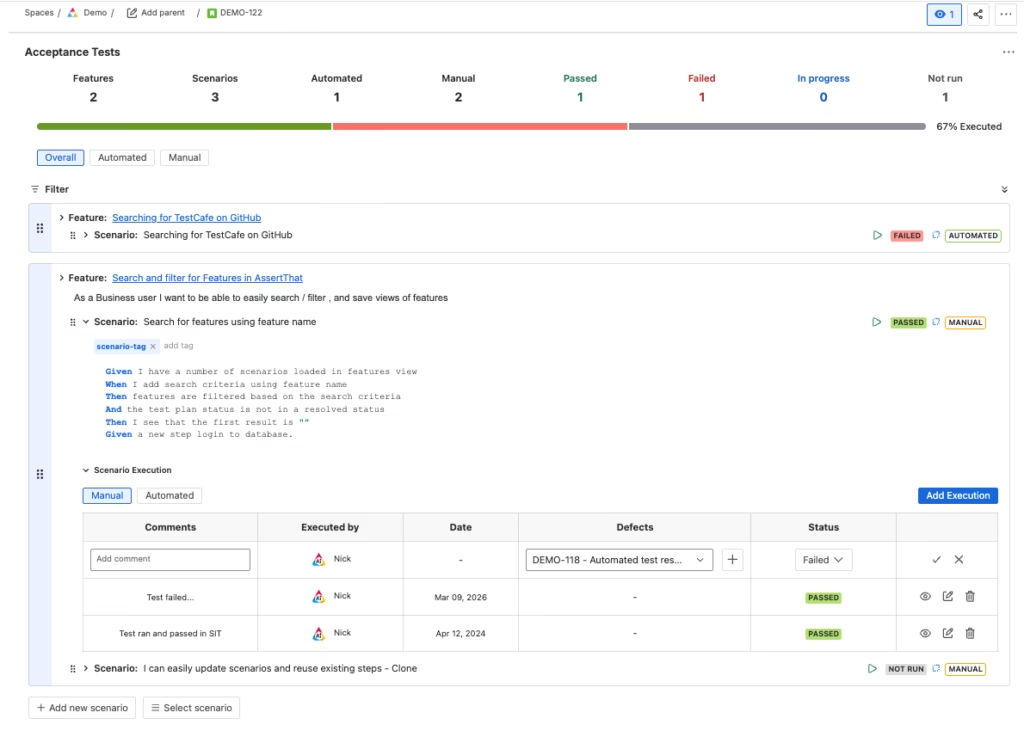
One of the biggest usability improvements in this release is the enhanced Acceptance Tests summary displayed directly on Jira issues.
Teams can now quickly see the execution status of tests linked to a user story without navigating away from the issue.
The issue view now shows:
- Number of features
- Number of scenarios
- Automated vs manual tests
- Execution status including:
- Passed
- Failed
- In progress
- Not run
- A visual execution progress indicator
This makes it much easier for product owners, developers and testers to understand the overall testing status of a feature at a glance.
Teams using Jira for Behaviour Driven Development (BDD) rely on clear visibility of test execution results, traceability between requirements and tests and reliable automation reporting. This release improves all of these areas within AssertThat.
Easier Scenario Management and Authoring
We’ve made several improvements to make working with scenarios easier and more efficient.
Improved Step Authoring
Steps now support enhanced auto-complete using type-ahead search, helping users quickly find existing step definitions when writing scenarios.
This improvement is available both:
- On the Jira issue view
- On the scenario editing screen
Improved Manual Test Execution
Manual testing workflows have also been improved.
Testers can now:
- Raise new Jira bugs directly from failed manual test executions
- Link existing Jira bugs to test executions
These improvements make it easier to move from a failed test to defect tracking without leaving the test execution workflow.
We have also improved the usability of this section to make it easier to see the overall status of scenarios and features during manual execution.
Manual Execution of Scenario Outline Examples
We’ve introduced new functionality allowing teams to execute manual scenario outlines for each example row.
Previously scenario outlines worked well for automated tests.
With this release, testers can now execute each example individually during manual test runs, allowing more granular tracking of test results.
Improved Test Automation Reporting
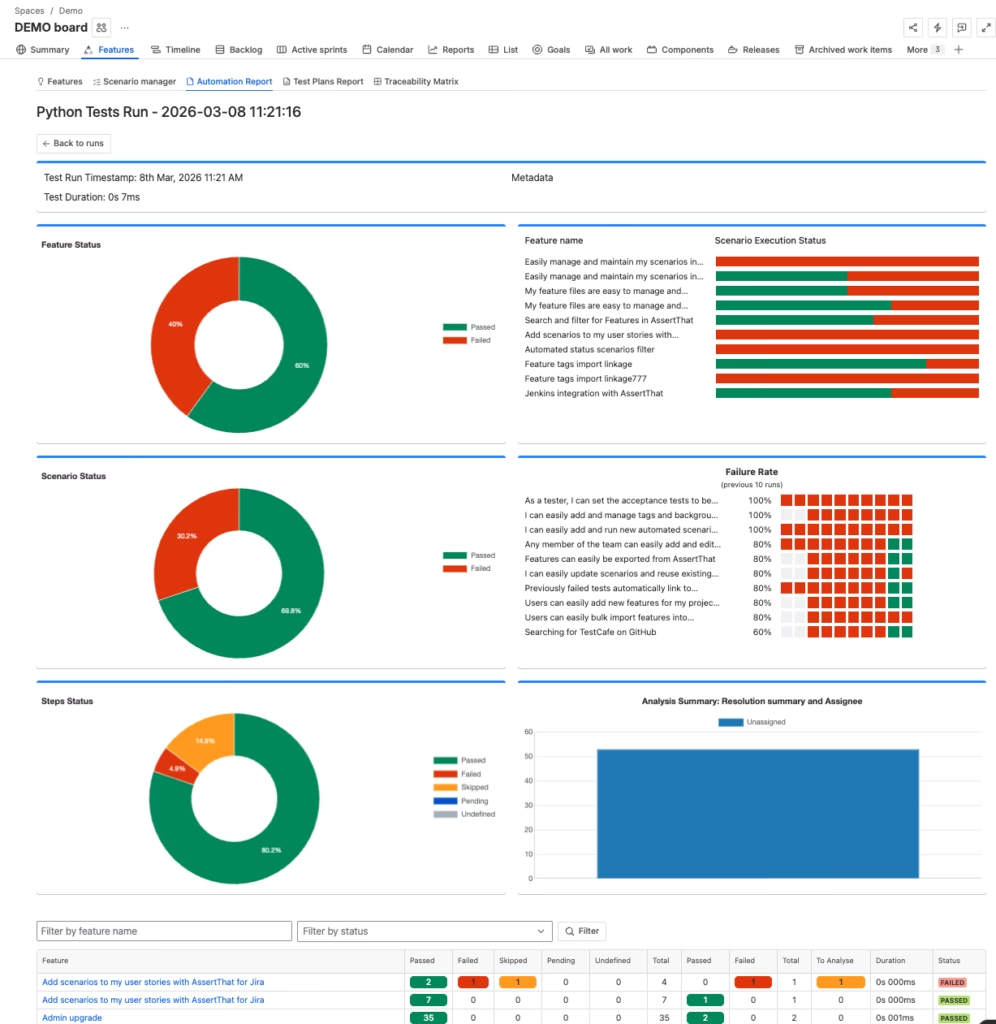
We have significantly enhanced the Test Automation Report, improving both the information displayed and how it is presented.
These changes make it easier to analyse automation results and identify issues within automated test suites.
New Automation Analysis Graphs
New visual reports provide better insight into automation performance:
Analysis Summary
Provides an overview of automation execution results across recent test runs.
Scenario Execution Status
Shows the distribution of scenario outcomes across executions.
Failure Rate
The failure rate report highlights the top 10 scenarios that have failed over the last 10 test runs.
This helps teams quickly identify flaky or unstable automated tests that require investigation.
Improved Automation Report Filtering
We’ve also introduced improved filtering capabilities for analysing automation results.
On the test run screen, users can now filter by:
- Execution date
- Metadata
- Test run name
Within feature views, users can now:
- See an execution status summary
- Filter scenarios based on multiple criteria
These improvements make it easier to analyse test results across large automation suites.
Improved Traceability and Test Plan Filtering
We’ve improved the filtering experience across several reporting areas.
Traceability Report
The traceability report now includes an improved JQL filtering interface, making it easier to construct queries when analysing relationships between requirements, scenarios and test execution.
Test Plan Report
The same improved filtering and JQL interface is now available on the Test Plan report, providing a consistent reporting experience across the application.
What’s Coming Next
Next month we will be releasing two major updates:
Completion of the Forge Migration
The remaining work to fully migrate the application to Atlassian Forge will be completed.
AI Test Scenario Generation
We will also introduce AI-powered test scenario generation, designed to help teams create BDD scenarios more quickly from Jira issues.
Summary
This update delivers major improvements across the platform:
- Migration of the Cloud app to Atlassian Forge
- Modernised user interface
- Improved test visibility directly in Jira issues
- Enhanced manual testing workflows
- New capabilities for manual execution of scenario outlines
- Significantly improved test automation reporting and analysis
- Better filtering and traceability reporting
These changes make AssertThat even more powerful for teams using BDD and Cucumber to manage testing directly within Jira.