An AI assistant that does the work
Ask in plain language to create, organise, run and report on tests. It asks for missing details, then acts across every tab.
AI assistant →
Design, plan, run and report on every kind of test inside Jira, and let the AI assistant do the work: from the Jira UI, from Atlassian Rovo, or from your AI tools over MCP.
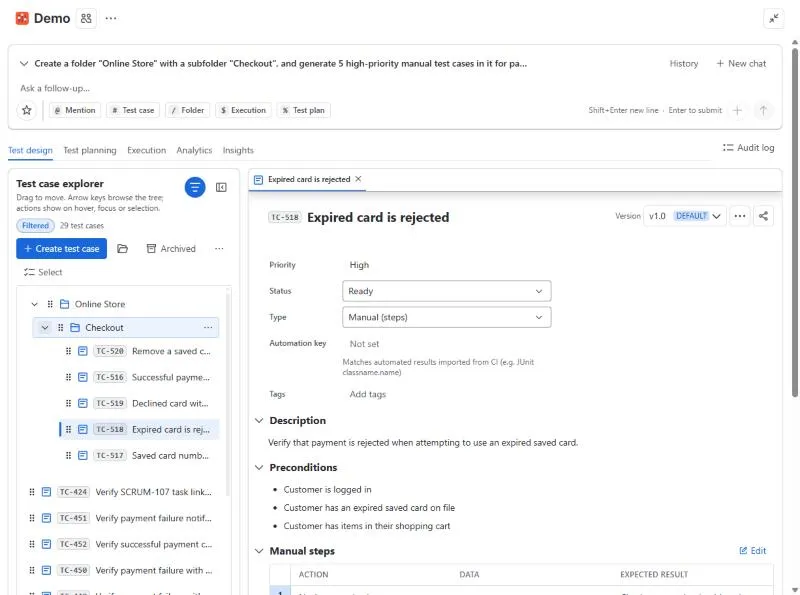
Ask in plain language to create, organise, run and report on tests. It asks for missing details, then acts across every tab.
AI assistant →Manual steps, BDD Gherkin or free-form cases with versions, shared steps, datasets, tags, custom fields and review approvals.
Test design →Test plans, executions with environments and builds, a step-by-step runner with timer and shortcuts, and Jira bugs from failed steps.
Execution →Timeboxed sessions with a charter, typed notes and screenshots, then turn findings into bugs and test cases.
Exploratory testing →19 chart types, PDF export, a Jira dashboard gadget, a Confluence macro and JQL functions for coverage and defects.
Analytics →A ready, at-risk or not-ready verdict per fix version, AI tests for coverage gaps, regression risk, duplicates and flaky quarantine.
Insights →The app switches itself on for your site and existing projects. No API keys: AI runs on Atlassian.
Read the guide →Point the AI assistant at a story with @PROJ-12, or generate test cases from the Jira issue panel, and review them.
Read the guide →Group cases into a plan, run it, import automated results and check release readiness for your fix version.
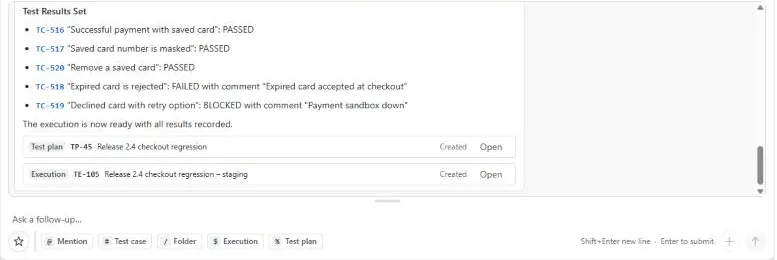
Read the guide →Type what you need in plain language: "create a regression plan from the Checkout folder, run it on staging and fail TC-518 with this comment". The assistant asks for anything missing, does the work across test design, planning and execution, and links every item it touched.
Every change is recorded in the audit log with the source AI assistant and your name.
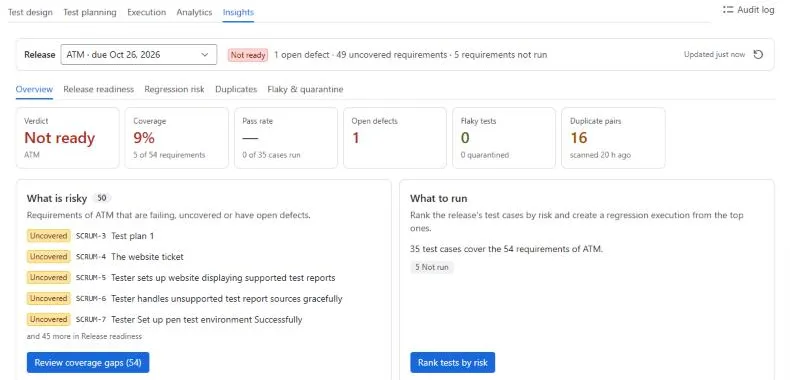
Pick a fix version and Insights gives a ready, at-risk or not-ready verdict with the reason, the uncovered requirements, the riskiest tests to run, flaky tests to quarantine and duplicates to clean up. Most of it is deterministic and costs no AI allowance.
JUnit, Cucumber, Playwright, TestNG, NUnit 3 and Robot Framework, from any pipeline with one HTTP call.
CI import →Manage tests from Atlassian Rovo, or from Claude, Cursor and Codex over MCP, with your own Jira permissions.
Rovo, MCP and REST API →Import CSV exports from Xray, Zephyr Scale, TestRail, QMetry and AIO, or Gherkin .feature files.
Import and export →Built on Atlassian Forge with no outbound network access. Test data, attachments and AI processing stay within Atlassian, and access follows your Jira project permissions everywhere: in the app, the issue panel, the AI assistant, Rovo, MCP and the REST API.
Every change is in the audit log with who made it and where it came from: the UI, the AI assistant, Rovo, the API or a CI import.
No. AI runs on Atlassian's hosted models through Forge. Every site gets a monthly AI allowance sized to its subscription, and everything else keeps working if it runs out.
Yes. Export your test cases to CSV and import them. Columns are detected automatically, and QMetry and AIO exports work too. See import and export.
No. Test data, attachments and settings are stored in Atlassian's Forge storage, and the app makes no calls to outside services. See security and data.
AssertThat BDD focuses on teams practising BDD with Gherkin and Cucumber. Autonomous Test Management is full test management for every kind of test, built around an AI assistant. Compare with AssertThat BDD.
Autonomous Test Management has a free trial on the Atlassian Marketplace.